Exit conditions
On top of the TP/SL you can define indicator conditions that close the position. They are optional; if you define none, the system uses TP/SL alone.
Exit priority within a bar
Checked against the bar's High and Low. If it fires, it closes immediately. It takes priority over any indicator signal.
If the TP/SL did not fire, the exit conditions are evaluated at the close. If they all hold at the same time (AND logic), it closes at the open of the next bar. With MaxAnd ≥ 2 it also generates AND combinations of exit conditions, just as on the entry.
BarsSinceEntry — exiting on time
BarsSinceEntry counts the bars elapsed since the entry (0 on the entry bar, 1 on the next one…). It is not a price indicator: its value depends on the open trade, which is why it can only be used in EXIT conditions. It lets you close on time, something neither the TP/SL nor the indicators do.
Closes on the 3rd bar after entering, whatever happens (if the TP/SL has not fired first).
Close crosses below SMA(Close,20)
It only closes on the crossover once more than 5 bars have gone by (it avoids premature exits). Remember: exits combine with AND.
Where to use it: in the Strategy Lab (indicator palette → it shows up as a fixed Exit, with an N range and operators), through AQL (BarsSinceEntry = 3) or in the Editor. In the Strategy Lab, turning BarsSinceEntry on forces the sweep onto the CPU (the GPU cannot compute it as a series). Export: EasyLanguage uses its native BarsSinceEntry function; MQL5 derives it from the position's open time; ProRealTime keeps a bar counter while in a trade.
Exit Engine — trailing, break-even and time-stop
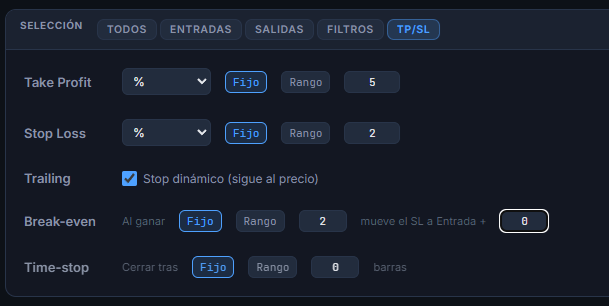
Almost everyone optimizes when to get in, but the real money is in managing the exit. Taking an edge that already works and tuning only its exit usually improves the result without touching the entry. These three tools are switched on in the Strategy Lab (TP/SL block), they coexist with the TP/SL and the indicator exit conditions, and they force the sweep onto the CPU (the GPU kernel does not know about them).
Instead of a fixed SL, the stop chases the favorable price: it rises with the high (on longs) keeping the SL distance. It captures trend and protects what you have made. Checkbox Dynamic stop.
Once the trade is far enough ahead (the trigger), the SL jumps to «entry + offset». With offset 0 it goes to breakeven (zero risk); with offset > 0 it locks in that gain. From then on it cannot lose.
Closes the position after N bars in the trade (at the next open). The direct-field equivalent of BarsSinceEntry, handy for sweeping.
- 1. You enter. The SL sits in its normal place.
- 2.Price moves your way and reaches the trigger («once ahead by X»).
- 3.The SL moves to Entry + offset and never drops below it again.
- 4.If price turns around, you exit at breakeven (or with the offset's gain), never at the original loss.
The trigger and the offset use the Stop Loss unit (%, amount or ATR). Activation is checked at each bar's close (using High/Low), without looking into the future.
The break-even trigger and the time-stop can be swept over a range (Fixed / Range pills). The sweep applies in Genetic mode, which adds them to the genome and evolves them; in exhaustive/random the first value is used. The break-even offset stays fixed.
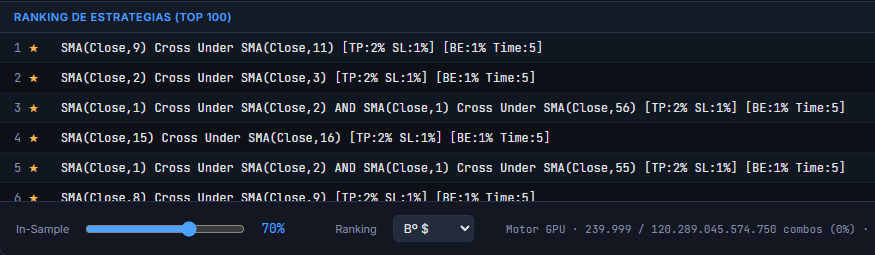
Every variant in the ranking states its management in the name, next to the TP/SL:
[BE:3% Time:20]
Empty if break-even and time-stop are off.
Persistence: the trailing, the break-even and the time-stop are saved with the strategy in the Portfolio and travel to Strategy Management, Multi-TF and every export (see the Export section).
Optimize the exits only
The real money is usually in managing the exit. With this you take a strategy you already like, freeze its entry and launch a sweep that varies the exit only — so you can see which exit management extracts the most from that same edge, without rediscovering the entry.
From three places, on one specific strategy:
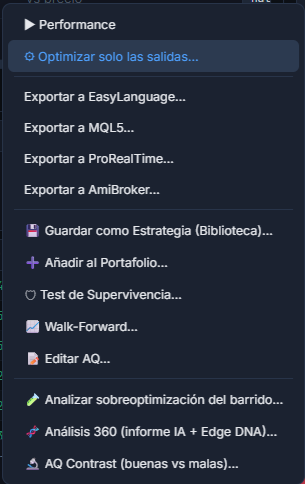
- →The Strategy Lab ranking: right click → ⚙ Optimize the exits only…
- →Portfolio: Optimize exits button.
- →Strategy Management: Optimize exits button.
- ·The entry is frozen as a fixed AQ Code block, with Max AND = 1 → it is neither combined nor touched.
- ·The exits are left free: set TP/SL, break-even or time-stop to Range, add closing indicators…
- ·It opens with the strategy's TP/SL preloaded as a starting point.
- ·You choose the mode: exhaustive (guaranteed optimum) or genetic (for large spaces).
The resulting ranking shows the same entry with different exit managements, sorted by performance. Note: if the entry uses an OR of groups, it is exported as one alternative per branch (an approximation); pure AND entries are exact.
AniQuant can be tried free for 30 days, with every module and no card.